
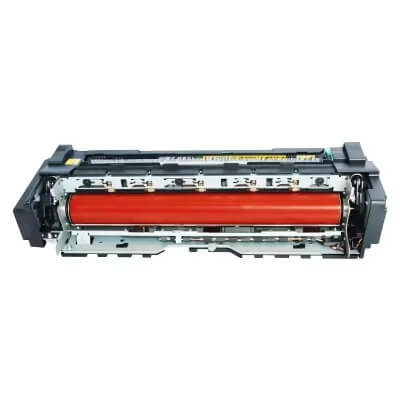
Executive Summary: A Fuser Unit Failure (often indicated by error codes like HP’s 50.x or Ricoh’s SC542) means the printer can no longer melt toner onto the paper. Whether the issue is a “Cold Fuser” (unfused toner) or “Overheating,” most fuser errors can be traced to the heating element, thermistor, or fuser film sleeve.
Common Fuser Failure Symptoms & Solutions
1. Cold Fusing (Toner Rubs Off the Page)
- The Symptom: The printed image looks clear but smears or wipes off easily when touched.
- The Cause: The fuser is not reaching the required melting temperature (typically 180°C). This is often due to a blown thermal fuse, a cracked ceramic heating element, or a faulty power supply connection.
- Action:
Check the fuser’s electrical continuity with a multimeter.
Inspect for loose wiring or oxidation on the fuser’s connector pins.
Replace the thermal switch if it has tripped.
2. Overheating & Paper Curling
- The Symptom: Paper exits the printer extremely hot, curled, or “accordion-jammed.” You may see “ghosting” where toner sticks to the fuser film.
- The Cause: The thermistor (temperature sensor) is failing to tell the control board to stop heating, or the control board itself is malfunctioning.
- Action:
Lower the temperature settings in the printer’s service menu.
Clean the thermistor surface from built-in toner debris.
Avoid long, continuous print runs that exceed the machine’s duty cycle.
3. Mechanical Wear (Worn Rollers or Tires)
- The Symptom: Repetitive marks, vertical streaks, or “paper crinkle” noises during the fixing process.
- The Cause: The pressure roller or the fuser “tires” (drive gears/bushings) have flattened or become loose due to friction and heat.
- Action:
Inspect the pressure roller for indentations or peeling.
Realign or replace worn drive gears to ensure even pressure across the paper.
4. Aging Fuser Film (Raised or Bubbled Cover)
- The Symptom: Incomplete fixing in specific areas or the fuser film sleeve slipping.
- The Cause: The Teflon/PFA coating on the fuser film has deteriorated or “bubbled,” creating a gap between the heat source and the paper.
- Action:
Replace the Fuser Film Sleeve. Ensure you apply high-temperature silicone grease during installation to prevent future tearing.
Pro-Active Maintenance Checklist
To prevent the dreaded “Fuser Error” and extend the lifespan of your unit:
- Use Quality Media: Low-quality paper produces excessive paper dust, which coats the thermistor and leads to incorrect temperature readings.
- Environmental Stability: Keep the printer in a temperature-controlled room. Extreme cold can cause “fuser warm-up timeouts.”
- Correct Power Supply: Always plug laser printers directly into a wall outlet, not a power strip or UPS, as the fuser requires a high initial current to heat up.
Repair vs. Replace: Which is Better?
| Problem Severity | Recommended Action | Efficiency Level |
|---|---|---|
| Damaged Film Sleeve | Replace Film only | High (Cost-effective) |
| Blown Thermal Fuse | Replace Fuse/Sensor | Medium (Requires technical skill) |
| Internal Gear Damage | Replace Entire Fuser Unit | High (Ensures long-term stability) |
Technical Meta Tags
- Primary Category: Printer Repair / Fuser Assembly Maintenance
- Common Error Codes: HP 50.1, 50.2, 50.4; Ricoh SC541, SC542, SC551; Canon E000.
- Core Components: Thermistor, Thermal Switch, Ceramic Heater, Pressure Roller, Fuser Film Sleeve.
- Keywords: How to fix fuser error, printer not heating up, toner smearing on paper, fuser unit troubleshooting, replace fuser film.
- Target Search Intent: Why is my printer showing fuser failure? How to reset fuser error? Fuser unit repair vs replacement.

Leave A Comment