
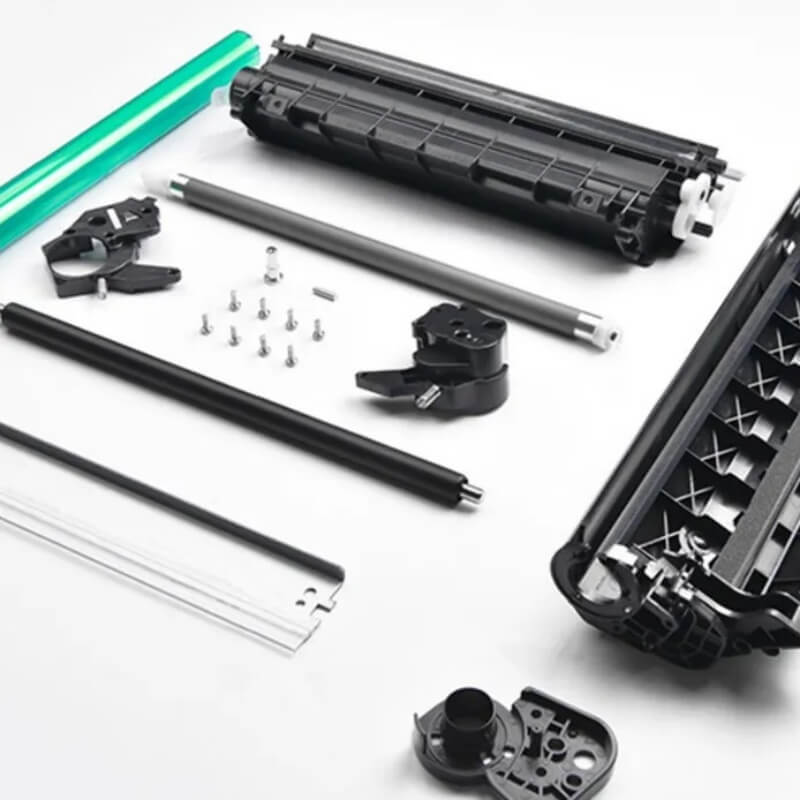
🛠️ Refilling Toner Cartridge Precautions: A Technical Component Guide
Executive Summary: Refilling a toner cartridge is more than just adding powder; it is a delicate mechanical overhaul. The success of a refill depends on the integrity of the imaging components (OPC drum, blades, and rollers). If these parts are contaminated or damaged during the refill process, the print quality will fail regardless of the toner quality.
🔍 1. Protecting the “Heart”: The OPC Drum
The Photosensitive Drum (OPC) is the most sensitive part of the cartridge.
- Light Sensitivity: Avoid direct sunlight and prolonged exposure to fluorescent lights. Light fatigue permanently degrades the organic coating.
- Handling: Never touch the printing surface with bare hands. Skin oils and sweat create permanent smudges.
- Safety: Do not clean with hard objects. One scratch equals one permanent vertical line on every print.
🧲 2. Maintaining Magnetic & Charge Rollers
These rollers control the electrical and magnetic delivery of the toner.
- Magnetic Roller (Mag Roller): Inspect the black coating. If it appears thin or shows the silver aluminum base, the prints will be too light. Keep it away from metal tools to prevent magnetic scratches.
- Primary Charge Roller (PCR): Clean the surface with a dry, soft cloth (avoid alcohol). A dirty PCR causes “background graying” or repetitive black spots. Warning: A damaged PCR surface can physically puncture the OPC drum.
📐 3. The Precision Blades: Doctor & Cleaning
These polyurethane strips are responsible for toner thickness and waste management.
- Doctor Blade: Controls toner thickness on the Mag Roller. If it is warped or loses elasticity, you will see uneven blackness or powder leakage.
- Cleaning Blade: Removes residual toner from the drum. Any microscopic gap or nick in the rubber will result in vertical black lines.
- Pro-Tip: If these blades show signs of yellowing or “curling” (aging), they must be replaced. They cannot be repaired.
🔌 4. Electrical Contacts & Mechanical Assembly
A cartridge is a high-speed machine that requires perfect electrical grounding.
- Point Contacts: Ensure all metal contact points (for the Drum, Mag Roller, and PCR) are clean and lubricated with conductive grease. Poor contact leads to blank pages or solid black pages.
- Seal Integrity: Check the recovery blades (seal strips). If deformed, toner will leak into the machine, potentially damaging the internal laser optics.
- Manual Rotation Test: CRITICAL STEP. Before installing, manually rotate the drum gear in the correct direction. If it feels stuck or “grinds,” do not force it into the printer, as this can break the printer’s drive motor.
📊 Component Failure Checklist
| Symptom | Suspect Component | Action |
| Vertical Black Lines | Cleaning Blade / OPC Drum | Inspect for nicks or scratches; replace. |
| Light/Faded Print | Magnetic Roller / Doctor Blade | Check coating thickness; replace roller. |
| Repetitive Spots | PCR / OPC Drum | Clean PCR; check for drum punctures. |
| Background Graying | PCR / Toner Chemistry | Clean PCR; verify toner compatibility. |
🚀 Technical Meta Tags
- Primary Category: Printer Consumables / Toner Refilling Technology
- Core Components: OPC Drum, PCR (Primary Charge Roller), Doctor Blade, Magnetic Roller.
- Maintenance Skills: Static discharge protection, ESD safety, Mechanical gear testing.
- Keywords: How to refill toner cartridge safely, cleaning OPC drum, magnetic roller coating wear, fixing toner leakage, printer maintenance tips.
- Search Intent: Why is my refilled toner printing light? How to clean a printer charging roller? Precautions for DIY toner refilling.

Leave A Comment