
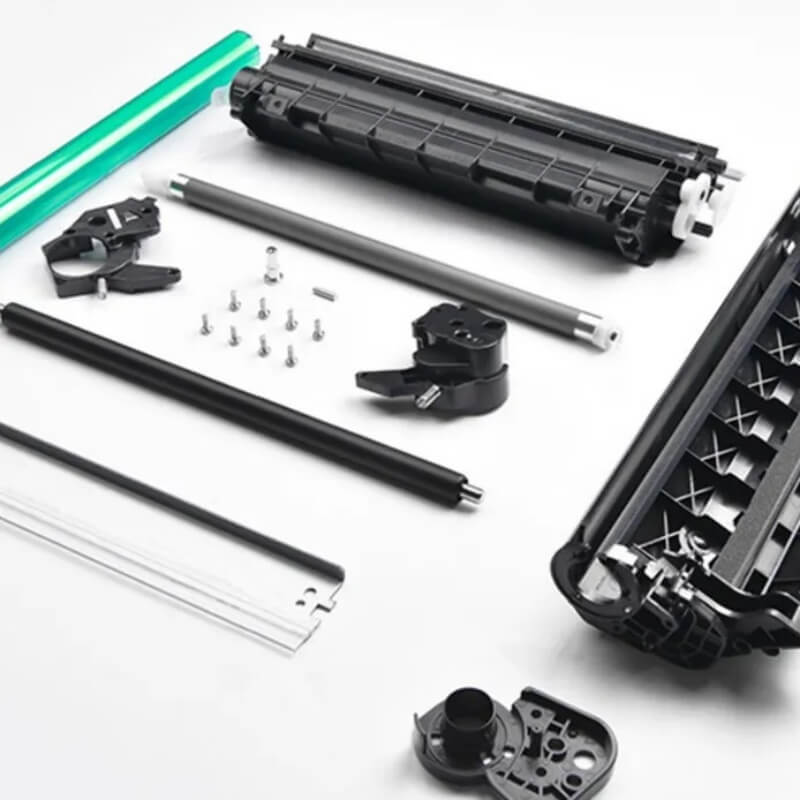
🏗️ What is a Printer Toner Cartridge? Anatomy, Principles, and Care
Executive Summary: A toner cartridge is the critical “all-in-one” imaging unit of a laser printer. It integrates the storage of toner powder with the electrophotographic components (OPC drum, rollers, and blades) required to translate digital data into high-resolution physical prints.
🔍 1. Key Components & Their Functions
Understanding the internal architecture of a toner cartridge is essential for diagnosing print quality.
- OPC Drum (Organic Photo-Conductor): The heart of the cartridge. This aluminum cylinder, coated with light-sensitive material, holds the electrostatic latent image created by the laser.
- Toner & Toner Container: Toner is a sophisticated blend of plastic resins, pigments, and silica. The container keeps this powder dry and flowing.
- PCR (Primary Charge Roller): Its sole job is to apply a uniform electrical charge to the drum surface, ensuring a “blank canvas” for each new page.
- Magnetic Roller (Developer Roller): Uses magnetic fields to “pick up” toner from the hopper and deliver it precisely to the charged areas of the OPC drum.
- Waste Toner Bin & Cleaning Blade: After every rotation, the blade scrapes away residual powder into this bin. This prevents ghosting and ensures the internal printer environment remains clean.
⚙️ 2. The 5-Step Laser Printing Process
- Charging: The PCR charges the OPC drum.
- Exposure: A laser beam “draws” the image onto the drum, neutralizing the charge in specific areas to create a hidden latent image.
- Development: The Magnetic Roller coats the latent image with toner, making the image visible on the drum.
- Transfer: The toner image is moved from the drum onto the paper via an electrical transfer charge.
- Fusing: The paper passes through fuser rollers where heat (180°C) and pressure melt the toner resin into the paper fibers for a permanent finish.
🛠️ 3. Maintenance: Extending Lifespan & Print Quality
The longevity of your cartridge depends on environmental control and mechanical care.
- Surface Protection: Never touch the OPC drum with your fingers. Skin oils can create permanent spots or “blind areas” on the drum, leading to repetitive print defects.
- Environmental Control: Store cartridges in a cool, dry place. High humidity causes toner to “clump,” leading to poor flow and potential paper jams.
- Storage Best Practices: If the printer is idle for weeks, remove the cartridge and store it in its original black bag. This prevents photoconductor fatigue caused by ambient light exposure.
- Quality Check: Scratched drums cause vertical lines; poor-quality toner leads to “loose” prints that rub off the page. Always use high-grade chemical toner for production-level results.
🆚 Comparison: Integrated vs. Split Cartridges
| Feature | All-in-One Cartridge | Split System (Drum + Toner) |
| Components | Drum, Toner, & PCR in one unit. | Separate Toner Tank and Drum Unit. |
| Pros | Easiest to replace; consistent quality. | Lower long-term cost; eco-friendly. |
| Typical Brands | HP, Canon | Brother, Konica Minolta, Ricoh |
🚀 Technical Meta Tags
- Primary Category: Laser Printing Consumables / Imaging Technology
- Core Components: OPC Drum, PCR Roller, Magnetic Roller, Waste Toner Bin.
- Scientific Principles: Electrostatic Latent Image, Thermal Fusing, Laser Exposure.
- Keywords: Toner cartridge anatomy, how laser printing works, extending toner life, OPC drum maintenance, Simitri HD toner components.
- Target Search Intent: What is inside a toner cartridge? Why are laser prints warm? Toner cartridge repair and troubleshooting.

Leave A Comment