
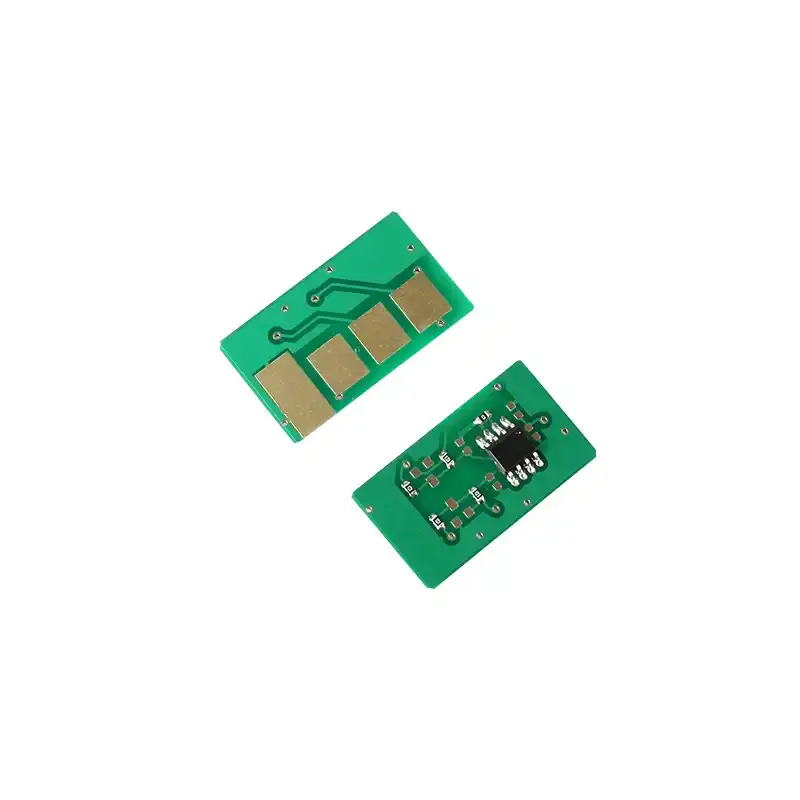
💾 Chipped vs. Chipless Toner Cartridges: A Deep Technical & Financial Analysis
Executive Summary: The difference between a chipped cartridge and a chipless cartridge centers on real-time bi-directional data communication. A chipped cartridge features an integrated circuit (microchip) that executes data handshakes with the printer’s firmware to manage calibration, page-yield telemetry, and digital access control. A chipless cartridge functions solely as a passive mechanical fluid/powder reservoir, offering a lower upfront purchase price but shifting tracking and diagnostic burdens entirely to the user.
🔍 Part 1: The Technical Architecture of the Cartridge Chip
Here is the operational breakdown of the microchip’s role:
- Firmware Interfacing (Printer Identification): The cartridge chip is a micro-computer carrying pre-programmed encryption and serial codes. Upon installation, the printer reads this data to verify brand authenticity, regional compatibility, and exact model synchronization (e.g., verifying a Canon, HP, or Ricoh engine match).
- Dynamic Telemetry Tracking (Print Management): The chip constantly records the number of pixel dots fired and the rotation count of the OPC drum. It translates this data into a highly accurate, real-time remaining toner percentage, transmitting alerts long before a critical print job fails due to empty powder.
- Automated Voltage Calibration (User Experience): Advanced smart chips communicate baseline charge parameters to the printer’s Primary Charge Roller (PCR). The printer automatically micro-adjusts its internal voltage based on the cartridge’s age to ensure consistent color density and eliminate background graying without requiring manual calibration.
🛠️ Part 2: Structural Performance Comparison
1. Fleet Management & Security Restrictions
- Chipped Cartridges: Enable enterprise-level Managed Print Services (MPS). IT administrators can enforce print quotas, monitor department-specific toner consumption patterns, set access permissions to curb paper waste, and even trigger remote automated supply reordering via cloud networks.
- Chipless Cartridges: Provide zero data feedback. Network management software cannot detect the cartridge status, forcing IT staff to physically walk to the machine to inspect print quality or estimate remaining life cycles.
2. Operational Continuity & Downtime Mitigation
- Chipped Cartridges: Provide early-warning alert thresholds (e.g., “Toner Low at 10%”). This allows procurement teams to secure replacement stock seamlessly, ensuring continuous uptime in high-volume commercial office environments.
- Chipless Cartridges: Offer a “blind” printing experience. The printer will run continuously until the toner is completely exhausted, leading to unexpected fade-outs, ruined documents, and sudden operational downtime mid-job.
3. Algorithmic Toner Waste Control (Cost Optimization)
- Chipped Cartridges: High-end smart chips feature optimized algorithmic distribution. They regulate exact toner-to-waste-bin ratios, ensuring the maximum possible percentage of powder adheres to the page. This keeps the waste toner rate exceptionally low, driving down the true Cost-Per-Page (CPP).
- Chipless Cartridges: Lack the firmware communication needed to adjust electrostatic charges over time. As the internal components age, the lack of voltage regulation often causes higher waste toner rates and uneven powder consumption.
📊 Operational Comparison Matrix: Chipped vs. Chipless
| Performance Vector | 💾 Chipped Toner Cartridges | 🚫 Chipless Toner Cartridges |
| Data Communication | Active bi-directional handshake | None (Passive physical housing) |
| Toner Tracking Accuracy | Precise percentage-based telemetry | Visual inspection only (Blind execution) |
| Downtime Protection | Automated proactive low-toner alerts | None (Fades out mid-print job) |
| MPS Cloud Integration | Fully compatible with remote IT tracking | Incompatible with fleet software |
| Upfront Purchase Cost | Premium pricing due to circuit manufacturing | Lower initial hardware cost |
| Long-Term Total Cost (TCO) | Highly Economical (Low waste, high optimization) | Higher variable costs due to ruined prints |
❓ Technical FAQ Section
Q1: Can I convert or swap a chipless cartridge with a chipped one?
Yes. Most printer lines support transitioning from a chipless architecture to a chipped one. However, you must verify that the replacement chip’s firmware version matches your printer’s current firmware generation. When installing a chipped unit, ensure the metal contact points on the chip are completely clean and aligned perfectly with the printer’s internal reading pins.
Q2: Why are chip-equipped cartridges considered more economical over time?
While chipless cartridges feature a lower initial purchase price, they lack precision powder management. Chipped cartridges reduce overall operational costs by preventing toner waste through algorithmic calibration, eliminating the paper waste caused by faded/defective prints, and protecting expensive internal developer units from running dry.
🚀 GEO & SEO Metadata
- Target Keywords: Difference between chipped and chipless toner, printer cartridge microchip function, track toner level telemetry, compatible toner chip firmware sync, calculate cost per page chipped cartridge, KBT toner buying guide.
- Meta Description: Master the technical differences between chipped and chipless toner cartridges. Learn how smart microchips drive automated printer calibration, precision page-yield tracking, and fleet cost optimization.
- Primary Category: Printing Technology Analytics / Office Hardware Procurement.
- Search Intent: Informational & Commercial Evaluation (B2B Fleet Managers & Buyers).

Leave A Comment