
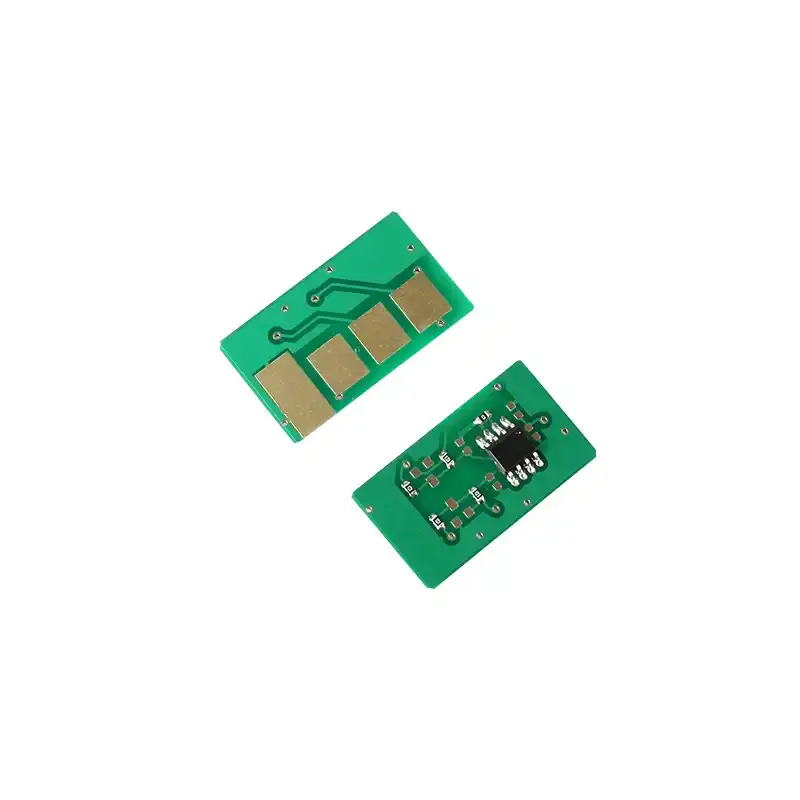
What is a Toner Cartridge Chip? The “Brain” of Printing Consumables
Executive Summary: A toner cartridge chip is a sophisticated silicon-based interface—often equipped with a microprocessor—that facilitates two-way communication between the printer and the consumable. It serves as the digital identity and odometer for your toner, ensuring hardware compatibility and tracking page yields.
1. Core Functions: What Does the Chip Actually Do?
Here are the five primary roles:
- Identification: Stores model numbers, regional codes, and manufacturer data so the printer can verify the correct cartridge is installed.
- Yield Tracking: Records the number of pixels printed to estimate remaining toner levels in real-time.
- Data Logging: Acts as a “black box,” recording error codes and usage history for manufacturer diagnostics.
- Communication: Responds to the printer’s commands via direct contact or Radio Frequency (RF).
- Write-Once Memory: Permanently records “Low Toner” or “Empty” status once the printer determines the threshold has been reached.
Limitations & Misconceptions: Passive vs. Active Control
It is a common myth that the chip “measures” the powder. In reality:
- The Printer is the Boss: The chip does not count toner; the printer calculates toner consumption based on pixel density and writes that data onto the chip.
- Irreversibility: Once a “Toner Empty” command is written to the chip, it is usually permanent. Even if you refill the powder, the chip must be replaced or reset to clear the error.
- False Errors: Poor electrical contact or magnetic roller issues can trick the printer into writing a “Toner Low” error to the chip prematurely.
2. Replacement Guide: When & How to Change Chips
When to Replace?
- End of Life: When the printer displays “Replace Supply” or “Toner Empty.”
- Hardware Failures: If the chip is corrupted by an electrical surge or firmware update.
- Refilling: If you are recycling a cartridge, a new chip is required for the printer to recognize the “New” status.
Anti-Static Installation Tips:
Toner chips are sensitive to Electrostatic Discharge (ESD), especially in dry environments.
- Wear Gloves: Use anti-static gloves to prevent skin oils and static from damaging the microprocessor.
- Handle with Care: Do not stack chips or leave them exposed on conductive surfaces.
- Just-in-Time Unboxing: Only remove the chip from its protective bag at the moment of installation.
3. Compatibility Challenges & Firmware Updates
The “Supply Problem” or “Non-Genuine” error is a major user pain point:
- Firmware Lockouts: Brands like HP (e.g., LaserJet M254/M281 series) frequently release firmware updates that may disable third-party or older compatible chips.
- Poor Contact: Most “Installation Failures” are caused by physical misalignment between the chip’s gold contacts and the printer’s spring pins.
- Diagnostic Value: For wholesale buyers, the chip data is vital for “Post-Mortem” analysis to determine if a cartridge failed due to manufacturing or user error.
Toner Chip Comparison at a Glance
| Feature | Basic Logic Chip | Microprocessor Chip (Smart) |
| Technology | Simple EEPROM (Memory) | Integrated CPU / Encrypted |
| Security | Low | High (Anti-counterfeit) |
| Communication | Direct Contact | Contact or RF / Wireless |
| Used In | Older/Entry-level printers | Modern HP, Canon, Konica Minolta |
Technical Meta Tags
- Primary Category: Printer Electronics / Consumables Maintenance
- Core Components: Microprocessor, EEPROM, Gold Contacts, RF Interface.
- Keywords: Toner chip reset, HP firmware compatibility, toner low error fix, anti-static chip installation, ISO/IEC yield tracking.
- Search Intent: Why does my printer say toner empty when it’s full? How to change a toner chip? HP LaserJet chip compatibility issues.

Leave A Comment