
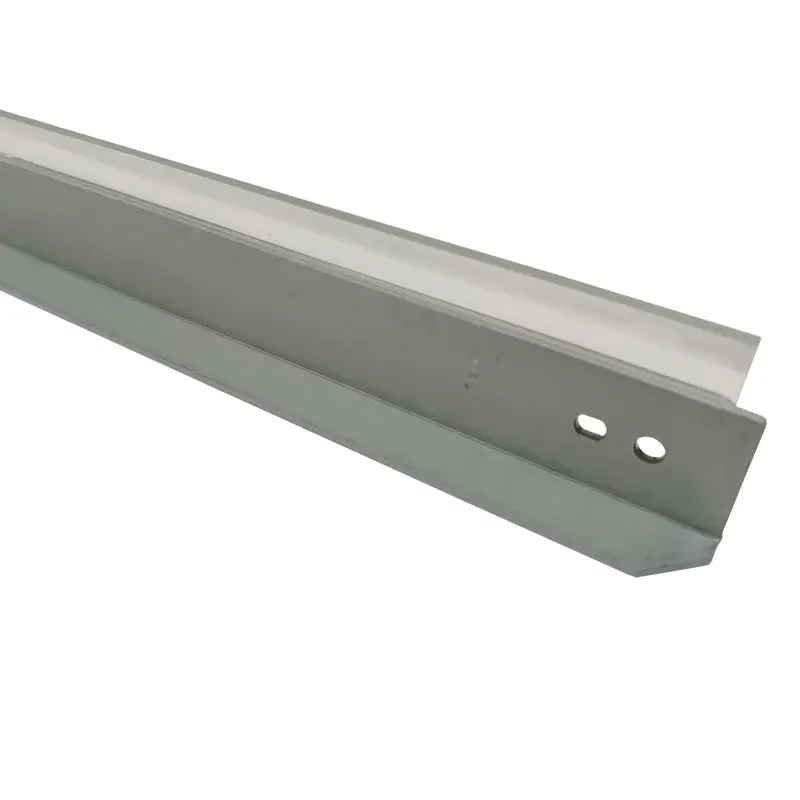
🧹 What is a Printer Wiper Blade? The Essential Cleaning Component
Executive Summary: A printer wiper blade (also known as a Cleaning Blade) is a precision-engineered component that maintains the surface integrity of the OPC drum. By physically removing residual toner after each rotation, it ensures high-definition prints and prevents “ghosting” or vertical streaking.
🔍 Core Function & Mechanical Principles
During the laser printing process, not all toner is transferred to the paper. A small percentage remains on the photosensitive drum.
- The Cleaning Mechanism: The wiper blade maintains linear contact with the OPC drum. As the drum rotates, the blade acts as a squeegee, scraping residual powder into the waste toner hopper.
- Structural Composition: It consists of a rigid metal base frame and a flexible, high-performance polyurethane (PU) sheet.
- Fixing Roller Cleaning: Beyond the drum, specialized high-temperature wiper blades (rated for 180°C) are used to clean the fuser rollers to prevent toner buildup and paper jams.
🧪 Material Science: Why Quality Matters
The material of the blade directly dictates the TCO (Total Cost of Ownership) and the lifespan of your toner cartridge.
- Polyurethane Sheet: Premium blades use wear-resistant materials with alicyclic adhesives rated for 150°C to maintain mechanical stability.
- Physical Indicators of Quality:
Visuals: High-quality PU appears translucent with a slight white or yellow tint.
Hardness: Must be moderate—too hard will scratch the OPC drum; too soft will fail to clean properly.
Smoothness: The edge must be perfectly straight without micro-deformations.
🛠️ Maintenance & Troubleshooting Guide
Unlike the Doctor Blade (which regulates toner thickness), the Wiper Blade is about cleanliness.
Signs Your Wiper Blade Needs Replacement:
- Vertical Light Black Lines: Indicates a gap or chip in the polyurethane edge.
- Local Background Graying: Caused by the rubber melting or deforming due to age or friction heat.
- Toner Buildup: If the blade fails, residual toner “ghosts” onto the next page, ruining print quality.
Expert Maintenance Tip:
The rubber edge is sensitive to environment and friction. When installing a new blade, always apply a small amount of setting powder (padding powder) to the edge to prevent it from flipping or sticking to the drum during the first few rotations.
🆚 Wiper Blade vs. Doctor Blade: The Difference
| Feature | Wiper Blade (Cleaning Blade) | Doctor Blade (Metering Blade) |
| Primary Goal | Remove waste toner from the drum. | Control toner thickness on the mag roller. |
| Material | Harder Polyurethane / Rubber. | Softer Polyurethane or Metal. |
| Position | In contact with the OPC Drum. | In contact with the Magnetic Roller. |
🚀 Technical Meta Tags
- Primary Category: Printer Consumables / Imaging Maintenance
- Key Components: Polyurethane Cleaning Blade, Metal Base Frame, Fuser Wiper Blade.
- Failure Symptoms: Vertical black lines, ghosting, drum scratches, background gray.
- Technical Specs: 150°C – 180°C heat resistance, alicyclic adhesive, translucent PU.
- Keywords: Wiper blade vs Doctor blade, OPC drum cleaning, Printer repair parts, toner cartridge components.

Leave A Comment